Binom Integration
General Settings
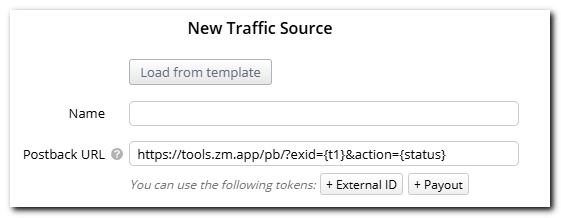
- Create a new traffic source and set up the tokens. Make sure that
exidis passed intot1.

For correct install tracking and proper attribution, the exid parameter must be the first parameter in the tracker URL, immediately after the ? sign.
Example: https://tracker.example.com/click.php?t1={exid}&key=XXXXX
For more accurate analytics, you can optionally pass the deposit amount and transaction currency.
Parameters:
payout– deposit amountcurrency– transaction currency (e.g., USD, EUR)
Example postback with payout and currency:
https://tools.zm.app/pb/?exid=abc12345&action=dep&payout=1.05¤cy=EUR
- In the Postback URL field, enter
https://tools.zm.app/pb/?exid={t1}&action={status}.
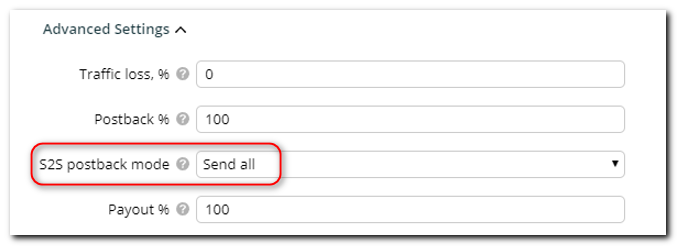
- Go to Advanced Settings ➜ S2S postback mode and select Send all.
- Check the Status-postback relation box and enter two postbacks:
- For registration:
https://tools.zm.app/pb/?exid={t1}&action=reg - For deposit:
https://tools.zm.app/pb/?exid={t1}&action=dep
- For registration:
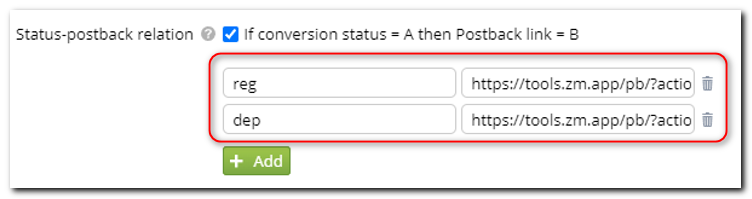
In the Conversion status field for each postback, specify the textual values of the statuses you receive from the advertiser. If there are multiple values, create a separate postback for each one.
Remembering the User Path
If your campaign uses a split of several offers, you need to set up traffic distribution so that when a user returns, they are directed to the same offer they saw during their first visit to the app.
To do this, set the following in the campaign settings:
- Type of distribution – Fix on Paths & LPs & Offers.

Note: This setting applies at the campaign level, not across the whole tracker. You need to set it for each campaign separately.
To turn off an offer, don’t delete it from the campaign settings. Just set its "Weight = 0" in the flow settings.
If offer binding is turned on, returning users will still go to the same offer they saw before — even if that offer has a weight of "0".
New visitors will be sent to the other offers.