Splits: overview and capabilities
What a split is and when you need it
A split flow is an advanced type of flow in ZM apps. It is used when a single scenario is no longer enough. Splits let you manage traffic across multiple rules at the same time: by GEO, platform, subs, and other parameters.
| Regular flow | Split flow |
|---|---|
| One scenario. You can split traffic between apps, but only within one platform or a limited combo like iOS + PWA. | Multiple scenarios at once. Full control over conditions: GEO, subs, any platforms, and more. |
Splits allow you to manage traffic using defined conditions or rules. With them, you can:
- split traffic by country;
- account for the user’s platform (iOS, Android, PWA);
- send users to different scenarios based on conditions;
- define a default path for traffic that does not match any rule.
A default rule is a fallback URL that opens if the user does not match any of the defined conditions.
This is mandatory protection against traffic loss.
Below is a diagram showing the general logic of how a split flow works in ZM apps.
Practical example
Working with a split flow is similar to working with a regular flow, but with one key difference — you control multiple scenarios instead of just one.
Let’s look at an example of a split flow with three active rules:
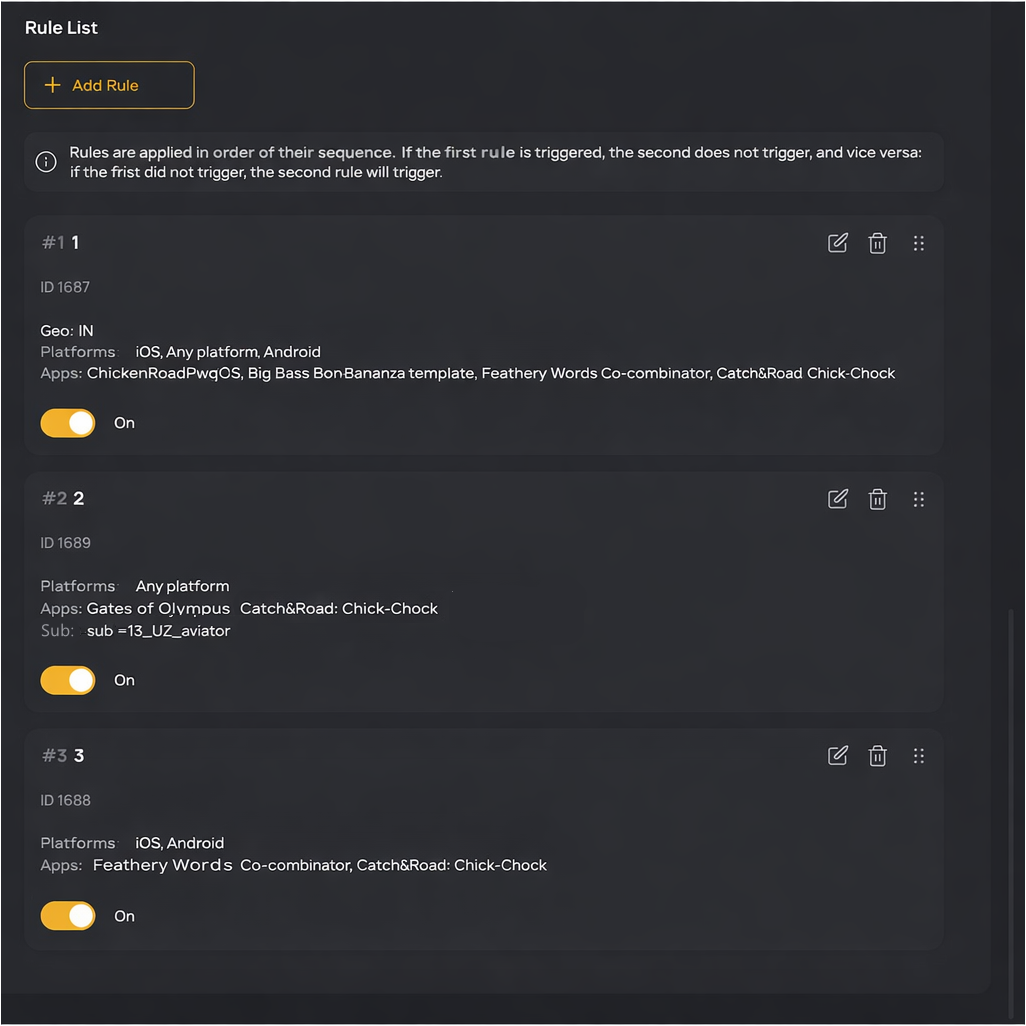
Rule #1 — GEO segmentation with app testing
| Parameter | Value |
|---|---|
| GEO | IN |
| Platforms | Any |
| Apps | ChickenRoadPwa; Big Bass Bonanza; Feathery Words; Catch&Road |
How it works: the rule checks whether the user is from India. If yes, the user is sent to one of the selected apps, and the remaining rules are not checked.
GEO rules let you run full regional traffic setups without duplicating configurations.
Rule #2 — Split by sub parameters
| Parameter | Value |
|---|---|
| Platform | Any |
| Condition | sub4 = 13_UZ_aviator |
| Apps | Gates of Olympus, Catch&Road: Chick-Chock |
How it works: this rule applies only to users who are not from India and whose link contains sub4=13_UZ_aviator.
Using sub parameters, you can isolate a specific campaign and route its traffic to a separate scenario.
If a user matches both conditions at the same time (for example, they are from India and came via a link with sub4=13_UZ_aviator), the system applies only the first rule, because it has higher priority.
Rule #3 — Mobile platform traffic
| Parameter | Value |
|---|---|
| Platforms | iOS, Android |
| Apps | Feathery Words Co-combinator; Catch&Road: Chick-Chock |
How it works
- This rule applies to iOS and Android users who did not match Rule #1 or Rule #2.
Here you can test which apps perform best on a broad audience or try new creatives without GEO restrictions.
This rule does not include web users. If a user comes from desktop or the system cannot determine the platform, the user will follow the default scenario.
Default rule
If none of the rules match, the user goes through the default scenario.
How to manage split flows
All split flows are located in the Splits section of the ZM apps dashboard. There you can:
- create new split flows;
- view the list and statistics of existing ones;
- edit rules and settings.
To learn how to create a new split flow, see our guide.
- Create narrow rules for target countries and sources.
- Build logic from top to bottom, from specific conditions to general ones.
- Don’t be afraid to add multiple apps. Traffic ratios are easy to change, and you can immediately see what works best.
- Give rules clear names — this makes analysis much easier.